TIMEX FamilyConnect™ – TIMEX

TIMEX - TIMEX FamilyConnect™ artwork TIMEX FamilyConnect™
TIMEX
Genre: Lifestyle
Release Date: September 29, 2019

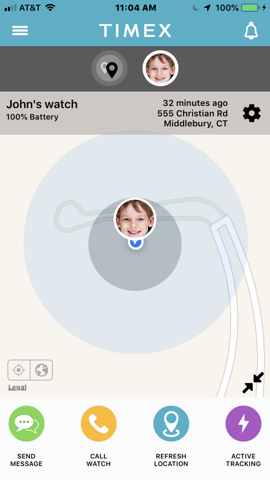
Be There, Even When You’re Not . . . with the TIMEX FamilyConnect™ cellular-connected watch for kids.

-Two-Way Calling
Stay connected with voice calls to and from the watch with approved contacts set in the TIMEX FamilyConnect™ app.

-Real-Time Location Sharing
See your child’s location in real-time on a map in the app. Set safe zones in the app and get alerts when your child enters or leaves each zone.

-Voice & Instant Messaging
Communicate quickly with recorded voice messages, typed or preset instant messages.

-SOS Alerts
In case of an emergency, hold the SOS button on the watch to call the parent and send an alert to the parent and all designated guardians.

-Private Secure Network
No spam. No strangers. Your child’s smartwatch can only communicate with approved contacts set in the TIMEX FamilyConnect™ app.

© © 2019 Timex Group USA, Inc.

Philips Hue Bluetooth – Signify Netherlands B.V.

Signify Netherlands B.V. - Philips Hue Bluetooth artwork Philips Hue Bluetooth
Signify Netherlands B.V.
Genre: Lifestyle
Release Date: June 29, 2019

Transform the way you experience light with Philips Hue Bluetooth. The Philips Hue Bluetooth app controls Philips Hue Bluetooth-enabled lights. Control up to 10 lights in a single room and set the perfect ambiance for any occasion. Look for the Bluetooth icon on the box to verify that your Hue products work with the Hue Bluetooth app.

SET THE MOOD FOR ANY OCCASION
The Hue Bluetooth app comes preloaded with 30 handpicked light scenes — tuned to the perfect color, temperature, and brightness — to fit any mood or occasion.

CREATE THE RIGHT ATMOSPHERE
Use your smart lights to set the mood in a single room. Dim, brighten, or change the temperature and color of your Bluetooth lights within the app.

SET THE RIGHT LIGHT FOR EVERY MOMENT
Complement the time of day and activity with light, whether you’re using the Energize light recipe to get going in the morning or Relax to wind down.

CONTROL UP TO 10 LIGHTS
Add up to 10* Hue Bluetooth smart lights to your home and control them all with the Hue Bluetooth app while within 30 feet of the lights.

*depending on iPhone/iPad generation.

CONTROL WITH VOICE
Use the Google Assistant or Amazon Alexa and simple commands, such as, “Alexa, dim the lights,” or, “Hey Google, turn on the table lamp,” to control your lights with your voice.

GET TO KNOW HUE
Learn more about the Philips Hue smart lighting system and find out the best way to start your smart lighting setup on http://www.meethue.com/bluetooth.

© © 2018-2019 Signify Holding. All rights reserved.

Faces – custom Watch Faces – Leu Kupchynau

Leu Kupchynau - Faces - custom Watch Faces artwork Faces – custom Watch Faces
Leu Kupchynau
Genre: Lifestyle
Release Date: September 26, 2019

# Over 20 categories
# Watch Faces for Apple Watch

The Faces app provides access to a huge collection of wallpapers for your Apple Watch completely free of charge! New wallpapers every day!

I thought over UI / UX design for a long time. Try my app now!

Like the app? – Leave a review!

Enjoy using!
© © Lev Kupchinov

Mi Home – xiaomi smarthome – Beijing Xiaomi Co., Ltd

Beijing Xiaomi Co., Ltd - Mi Home - xiaomi smarthome artwork Mi Home – xiaomi smarthome
Beijing Xiaomi Co., Ltd
Genre: Lifestyle
Release Date: January 27, 2015

A professional app to help you manage your intelligent devices.
• Add new devices with a few easy steps
• Control your device wherever you are
• Get the status of you devices in real time
• Share your devices with friends and family members
• Set up and perform intelligent tasks
• Continued use of GPS running in the background can dramatically decrease battery life

© © 2015年 小米移动软件

Portal from Facebook – Facebook, Inc.

Facebook, Inc. - Portal from Facebook artwork Portal from Facebook
Facebook, Inc.
Genre: Lifestyle
Release Date: May 29, 2019

The Portal app helps you manage your Portal devices right from your smartphone. Portal and Portal+ are home video communications devices that make it easier to connect with loved ones, and feel like you’re in the same room, even when you’re far apart. With the Portal app, you can send photos directly to your Portal's Superframe, call your Portal, manage your favorites and more.

ADD PHOTOS TO SUPERFRAME
The Portal app makes it easy to add photos to your Portal's Superframe right from your phone's camera roll.

CALL HOME FROM YOUR PHONE
When you're away from home, you can use the Portal app to call the Portal in your home and easily talk to household members.

MANAGE YOUR FAVORITES
Add and manage people you regularly call as “favorites” right from your smartphone.

© © 2019 Facebook Inc

Globe Suite – Globe Electric Company Inc.

Globe Electric Company Inc. - Globe Suite artwork Globe Suite
Globe Electric Company Inc.
Genre: Lifestyle
Release Date: August 4, 2018

Globe Electric – The Creative Energy Company® since 1932.

Having a Smart home has never been so easy! Simply download the Globe Suite™ APP to get started.

The Globe Suite™ APP is a complete smart home control system that connects your Globe Suite™ smart LED bulbs, smart plugs, smart cameras, smart sensors, and much more all under one roof.

(No Hub Required)

Configure, monitor and control an infinite number of Globe smart devices in one user-friendly application, right from your phone, anywhere in the world. Paired with your Amazon Alexa or Google Home, our smart devices can be quickly programmed to respond to voice control.

Through the Globe Suite™ application, instruct your Globe smart products to activate according to a variety of variables including temperature, weather and time of day. Share device control with your family members and receive real-time alerts to ensure the highest level of efficiency, interactivity, control and safety for your home.
© © Globe Electric. All Rights Reserved

Nanoleaf Smarter Series – Nanoleaf

Nanoleaf - Nanoleaf Smarter Series artwork Nanoleaf Smarter Series
Nanoleaf
Genre: Lifestyle
Release Date: November 24, 2015

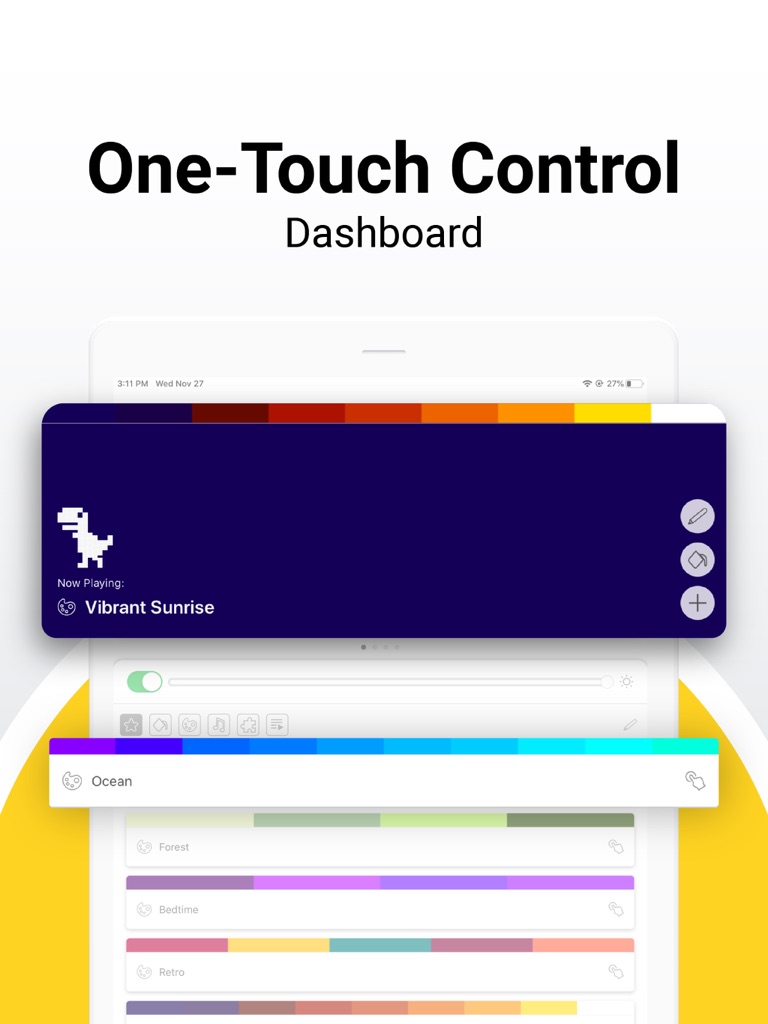
Operating HomeKit-enabled smart lighting has never been easier—the Nanoleaf App features support for the Nanoleaf Light Panels, Rhythm, and Zigbee HA1.2 smart lights. Perfect light is only a finger tap, or a voice command away.

Download now to own this ultra-advanced light switch!

The Nanoleaf App supports voice control through Siri, Google Assistant, and Amazon Alexa. You can use the Nanoleaf App to turn your smart lighting on and off, control brightness, group lights by home and by room, create and use Scenes, and control all of the lights in a room through HomeKit. The Schedules feature of the app enables you to automate your home’s lighting—turn the lights off at night, wake up to light in the morning, or remind yourself to exercise… just a few of the nearly limitless ways that smart lighting can support your smarter life.

For Nanoleaf Light Panel users, there's an included Discover Community that enables sharing and downloading of scenes created by other Light Panel users, as well as a built in design generator that provides suggestions for ways to layout the panels.
© © Nanoleaf Canada Limited

Parental Control App – OurPact – Eturi Corp.

Eturi Corp. - Parental Control App - OurPact artwork Parental Control App – OurPact
Eturi Corp.
Genre: Lifestyle
Release Date: February 4, 2015

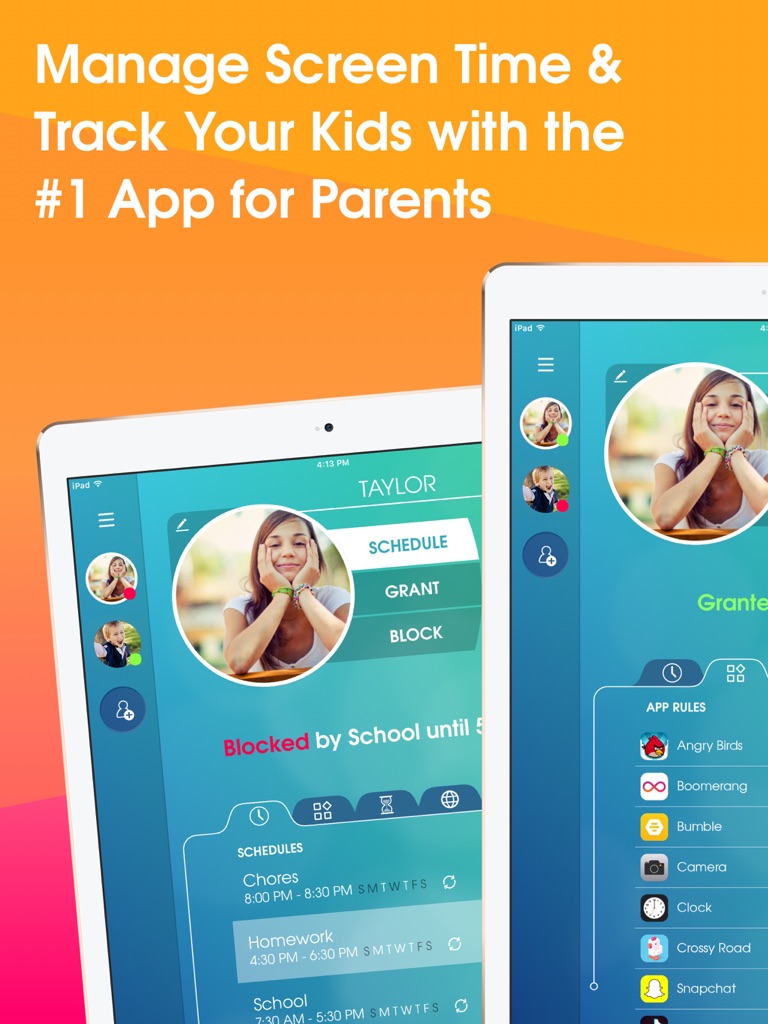
OurPact is a breakthrough screen time parental control app, text & app blocker, website blocker, GPS locator, kid tracker and family locator that enables parents to manage their family's screen time and locate family members.

Use OurPact Parental Control App, App Blocker, GPS & Family Locator for complete family management:

• App Blocker – Block internet, block text messages, and block apps at-a-touch
• Geofencing with Places – parents can create GPS geofences around specific locations and receive real-time alerts when their kids leave and arrive at home, school or any set zone
• Schedules – Schedule screen time throughout the day or week
• App Rules – Block specific apps
• Kid Tracker – Track your kid's location using Family Locator and Places
• Screen Time Allowance – Set daily screen time limits for your kids
• App List & App Blocker – Discover what apps are on your child's device and begin app blocking
• Block Texting – Use OurPact parental control app to block access to texting apps
• Block/Allow Websites – prevent access to specific websites for safe internet browsing
• New App Alerts – receive alerts when new apps are installed on your child’s device
• Find My Family – OurPact's Family Locator allows parents to locate any family member using geolocation and geofences.
• Find My iPhone & iPad – OurPact's Family Locator also lets parents find the location of all their individual devices paired to their parent account in case of lost or stolen items.

• Porn Blocker – Block all adult content on your child's iOS device

OurPact gives you the power to block apps like social media and games while also allowing you to track your kids.

Our parental control app and family locator allows parents to foster healthy habits and manage their child's screen time using screen time allowance, blocking specific apps, blocking texts, and scheduling daily screen time according to a child's daily routine. OurPact also gives parents the ability to discover what apps are installed on their child's devices using App Lists and their children's whereabouts with Family Locator.

OurPact is a complete kid tracker and parental control app solution that gives parents control over screen time and the peace of mind, knowing their children's location at any moment.

OurPact's app blocker, kid tracker, and screen time management platform is perfect for any family. By pairing your family's iPads, iPhones, iPods or other device platforms to OurPact parental control app, you have the power to manage your entire family's screen time & device locations from one powerful application.

Recommendations:
• Use OurPact' app blocker and parental control app solution to reinforce spoken or written agreements with your child regarding screen time limits and device use.
• Set daily screen time allowance and teach your children how to budget their screen time effectively.
• Use OurPact parental control app to block social media or games with a single touch, while leaving apps that help your children learn and grow.
• Find my family or locate lost or stolen items using Family Locator.
• Set one-time or recurring schedules for your child to manage screen time on-the-go.

OurPact parental control app and family locator was designed with the family in mind as an effective, guidance-based screen time management solution.

OurPact offers a Plus and Premium monthly auto-renewing subscriptions charged to your iTunes account. Try one free for 1 week. You'll be billed monthly within 24 hours of the end of the current billing period. You may cancel or turn off auto-renewal of your OurPact subscriptions any time by going to the user's Account Settings. To avoid being billed for an additional period, subscriptions must be canceled at least 24 hours before the end of the current period.

For more information visit:
ourpact.com/privacy
ourpact.com/terms

If you have any questions or need technical support, do not hesitate to reach us via email: support@ourpact.com
© © 2015-2019 Eturi Corp.